×
×
This document applies to the SUP series professional cleaning systems and is intended to help customers quickly understand the machine's operating procedures and then proceed with installation and testing. For more detailed information, please refer to the instruction manual.
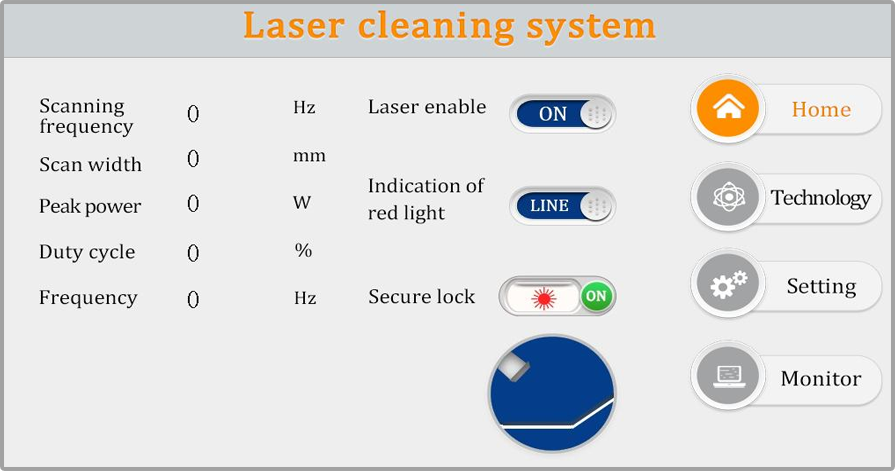
Figure 1 Home page
① This interface can see the current process parameters (this page can not modify the process) and instant alarm information.
② Power default ON, red light default LINE, When the display OFF will not send an enabling signal to the laser and can be used to test the vent function Close the red light indicator and show that the "DOT" motor stops swinging, when the red light is a point to adjust the center.
③ "Safety lock", when the gun body "safety lock" is opened, the displayed green "ON" can be normally illuminated, and the closed red "OFF" can not shine.
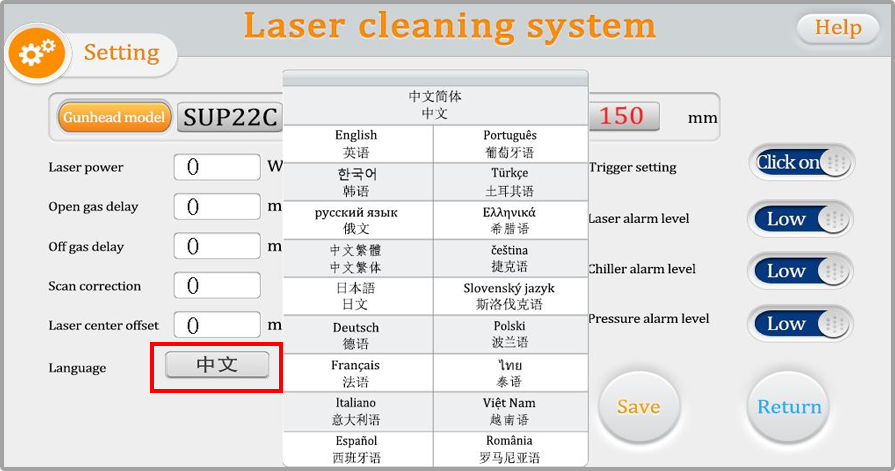
Figure 2 Home-setting-language settings page
1. Confirm the focusing lens model
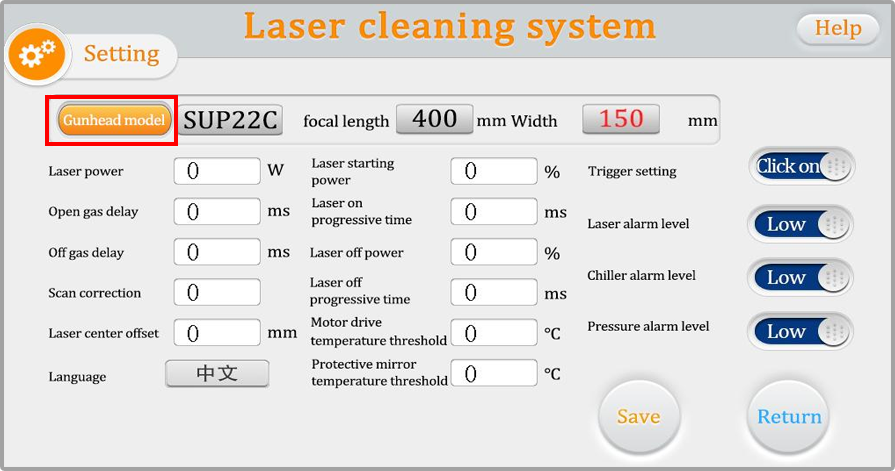
Figure 3 Home-setting page
Please click on the "Gunhead model" area and select the corresponding scanning width based on the model of the focusing lens you are using.
The password for the settings interface is: 123456.
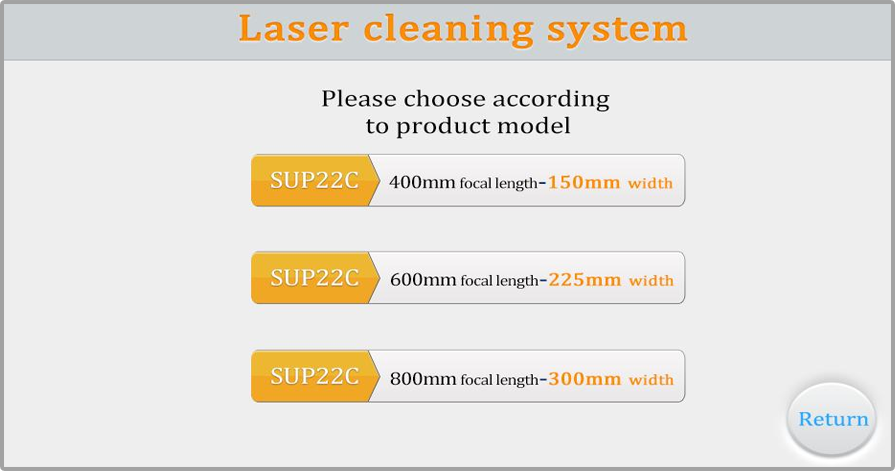
Figure 4 Setting-gunhead model
As shown in the figure 3, the scanning width is determined by the gunhead model and the focusing lens.
Taking the SUP22C as an example:
Using an F400 focusing lens, the maximum cleaning width is 150mm;
Using an F600 focusing lens, the maximum cleaning width is 225mm;
Using an F800 focusing lens, the maximum cleaning width is 300mm.
2. Cleaning parameter settings
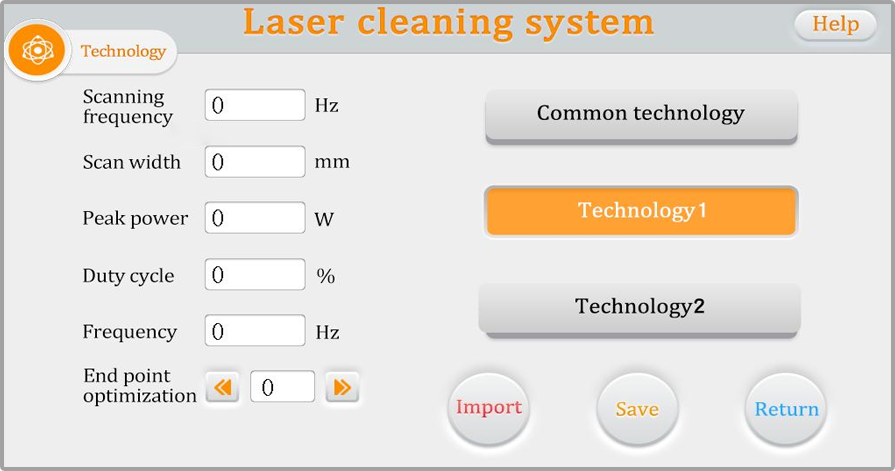
Figure 5 Home-technology page
① The process interface contains the process parameters of debugging, click the box (Orange) to modify, click OK, and then save in the quick process. Click import (Modify-Save-Import-Return).
② The scan frequency range is 30-100 HZ, and the scan width range is 0 ^ 300mm. (Common scanning speed: 50 hz, and 300mm in width).
③ The peak power should be less than or equal to the laser power of the parameter page (if the laser power is 1500W, this value is not higher than 1500).
④ Duty cycle range 0 to 100 (default 100, usually not changed).
⑤ The pulse frequency range is recommended from 5-5000Hz (default 2000, usually not changed).
⑥ Click the “HELP” button on the top right to get more relevant parameter explanations.
⑦ Endpoint optimization: range-30~30, which can eliminate the phenomenon of uneven light out at both ends of the cleaning track, and different scanning frequencies correspond to different optimal parameters. The default is 0, please adjust to the ideal state according to the actual situation.
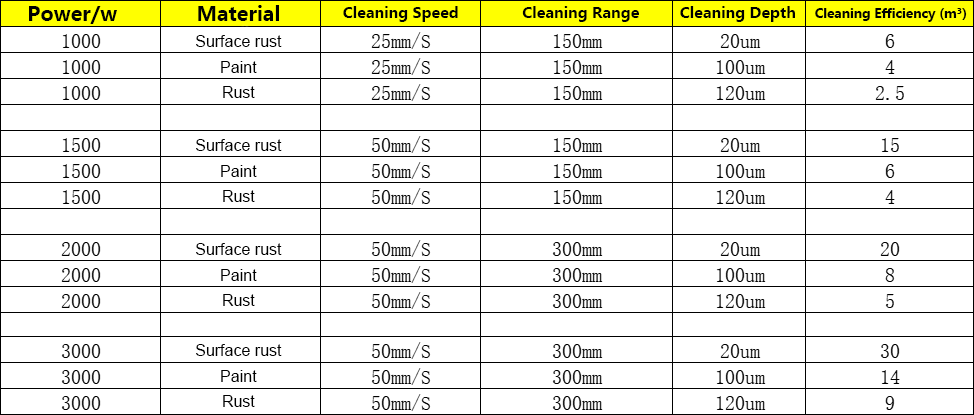
Figure 6 Cleaning Parameters Table
3. Focus Confirmation
By scanning back and forth at varying distances, the point where the sound and sparks are strongest indicates the focal point. Cleaning should be performed at this distance for maximum energy transfer.
The following are reference values based on different focusing settings:
F400 focus (The optimal distance between the gun head and the material is approximately 35-40 cm for maximum energy);
F800 focus (The optimal distance between the gun head and the material is approximately 65-75 cm for maximum energy).
4. Gas Usage
Please use filtered, oil-free, and moisture-free air of at least grade 3 purity, or other inert gas, with a gas pressure of no less than 2 Bar.
During cleaning, please maintain a stable distance between the gunhead and the workpiece, and keep your hand speed consistent.
 Hot News
2025-11-01
2025-12-03
2025-12-01
2025-11-25
 EN
EN